
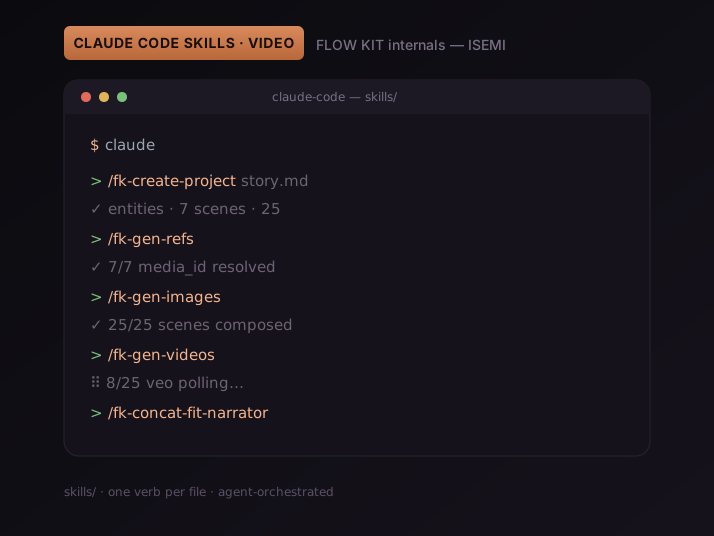
For the first half of the year the agent conversation was about models. Which model wins at coding. Which one survives a long context. Which one calls tools without going off the rails. Around April that conversation quietly shifted. Reddit threads, talks, and the agent shop-talk channels stopped arguing about Sonnet vs Opus vs GPT-5 and started arguing about something else: skills. Reusable workflow artifacts that turn a generic coding agent into a domain-specific operator.
We have been writing skills for nine months. Specifically, for an AI video pipeline called FLOW KIT — twenty-something Markdown files in skills/ that drive Veo 3.1 through Claude Code. Video is a brutal place to stress-test the skill model, because every mistake costs you a real $0.50 Veo call or thirty wasted minutes of polling. Some patterns survived production. Others looked elegant on day one and got deleted six weeks later. This is a write-up of which is which.
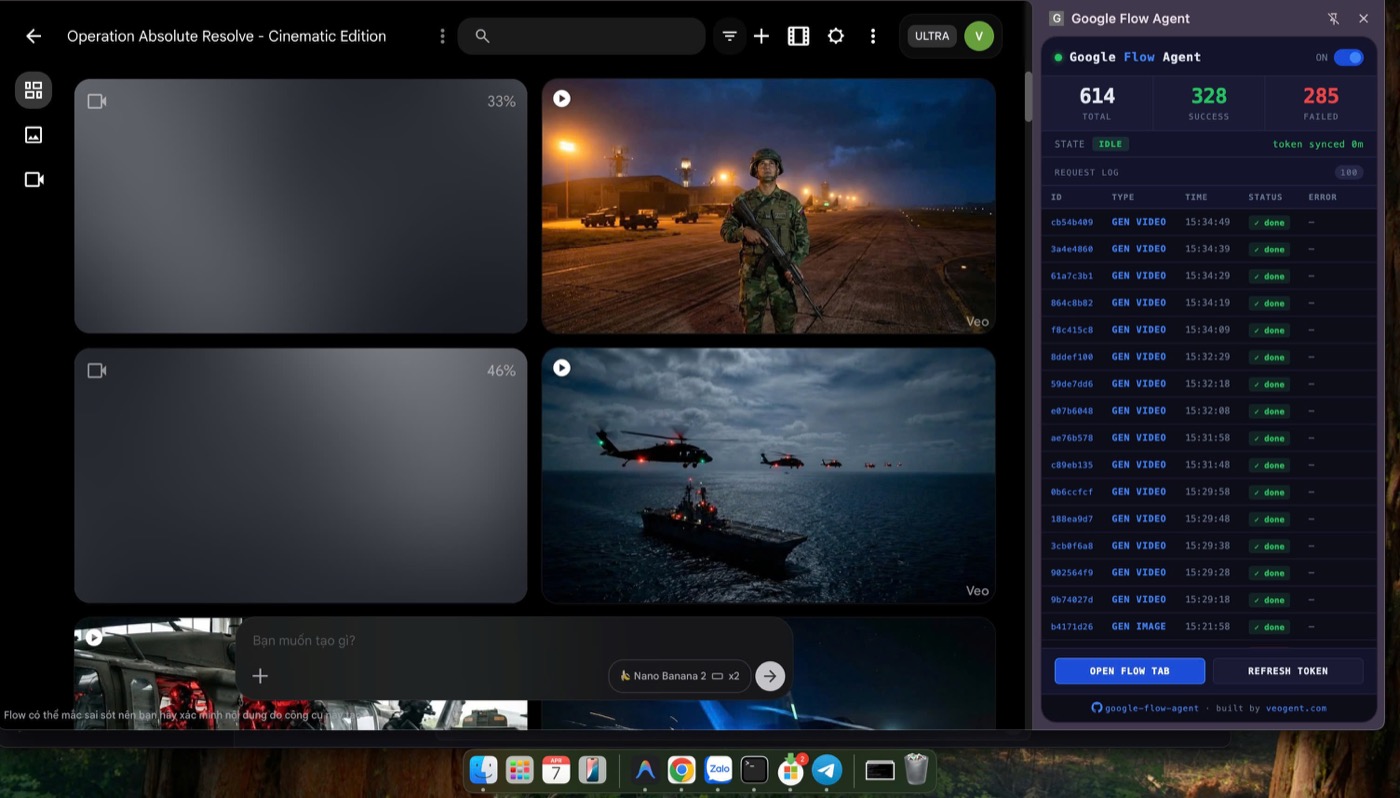
What a Claude Code skill actually is
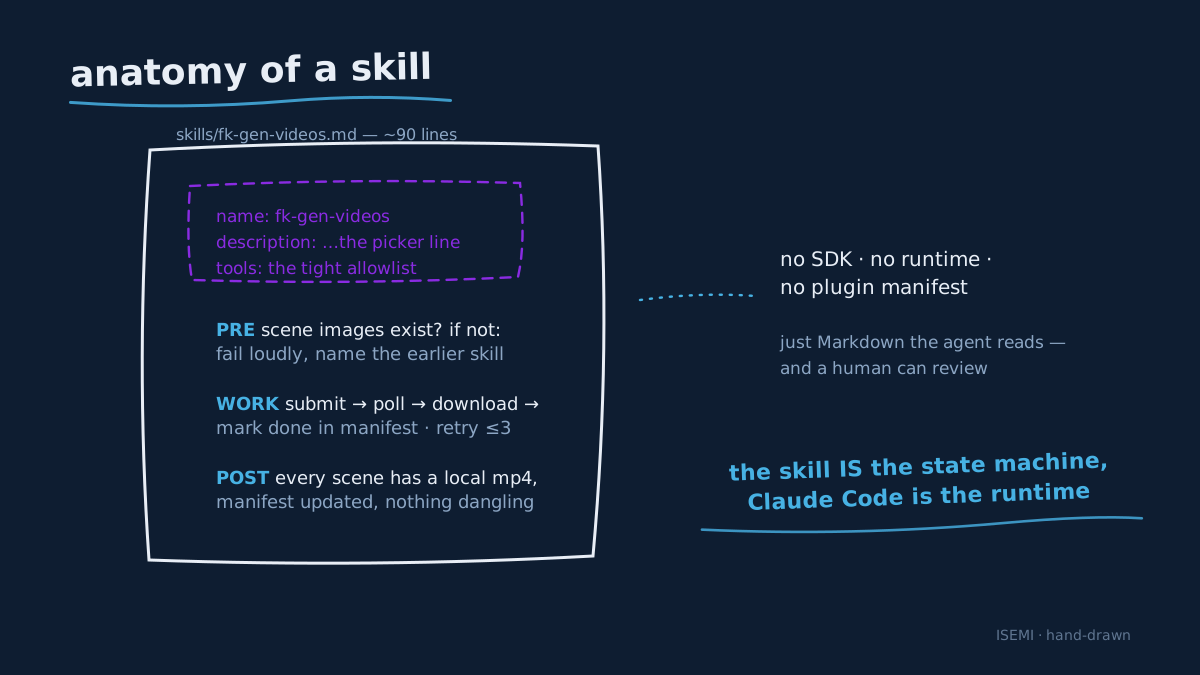
Strip the hype off and a skill is a Markdown file in a skills/ directory with a short YAML header. The header carries a name, a description, and sometimes a list of allowed tools. The body is a recipe written for an agent reader — not a human reader — that says, in natural language, what to do, in what order, and what to verify before moving on. Claude Code picks the file up automatically when you reference skills/ from your CLAUDE.md, and exposes the skill as a native slash command (/your-skill-name) inside the terminal.
That is the whole mechanism. There is no SDK, no runtime, no plugin manifest. Skills are agent-CLI-agnostic by design: Codex CLI and Gemini CLI read the same files via their own entry points. What that gives you is a portable, reviewable, grep-able workflow primitive. A skill is a recipe an agent can execute, a doc a contributor can read, and a diff a reviewer can comment on — all in the same artifact.
The reason the format works for video is that real video pipelines are full of long-tail operational decisions: how many concurrent Veo calls before throttling kicks in, what to do when a media_id expires, when to fall back from i2v to t2v. Encoding those decisions in code locks them down. Encoding them in a skill lets the agent route around them when reality changes. We have replaced more procedural Python with skill prose in the last six months than we replaced Python with TypeScript in the previous two years.
Why AI video is the right stress test
Three properties make AI video the right place to test whether the skill model holds.
It is multi-step. A single project goes through eight named phases: project, video, scenes, reference images, scene images, video generation, narration, concat. Each phase has its own success criteria, its own retry semantics, and its own failure modes. Generic "do the thing" prompts cannot survive that surface area.
It is asynchronous and expensive. A scene-image call resolves in seconds. A Veo render call resolves in two to five minutes, and the cost shows up on a paid Flow plan. If a skill loses its place inside a 25-scene run, the cost of restarting is real money and real time. Resumability is not a nice-to-have.
It branches. Some projects want one main timeline. Some want a hero scene with three cutaways. Some want narration before concat, others want concat first then re-trim. A skill that ships a single hardcoded sequence dies on day two.
If your skill model survives video, it will survive almost anything else.
FLOW KIT's skill anatomy in practice
The user-visible surface of FLOW KIT is a stable set of /fk-* commands. The five you reach for first cover most of a production run; the rest cover the edges.
| Command | One-line job |
|---|---|
/fk-create-project | Reads a story, drafts entities and scenes, writes the project shell |
/fk-gen-refs | Generates one reference image per entity, blocks until every UUID resolves |
/fk-gen-images | Generates each scene image with the right references applied |
/fk-gen-videos | Submits Veo i2v jobs and polls until each clip is downloaded |
/fk-concat-fit-narrator | Trims each scene clip to the narrator track and concatenates the final cut |
Look at /fk-gen-videos as the worked example. Its skill file is around 90 lines of Markdown. The opening section sets the agent's frame: "You are processing a list of scenes for video generation. Each scene has a scene image. Your job is to submit one GENERATE_VIDEO per scene, poll until the clip is done, download it, and mark the scene complete in the project manifest. You will not skip scenes that already have a clip on disk. You will not retry a scene more than three times." The middle is the API shape — a copy of the FastAPI route and the schema of the response. The end is a checklist of post-conditions: every scene has a local mp4, the manifest is updated, no media_id is left dangling.
The agent reads that and runs it. No internal state machine, no scheduler, no event bus. The skill is the state machine, expressed as prose, and Claude Code is the runtime.
Pattern 1 — one skill, one verb
The single biggest design choice was resisting the temptation to write a /fk-do-everything skill that creates the project, generates everything, and uploads. It would have been one nice command. It would also have been impossible to debug.
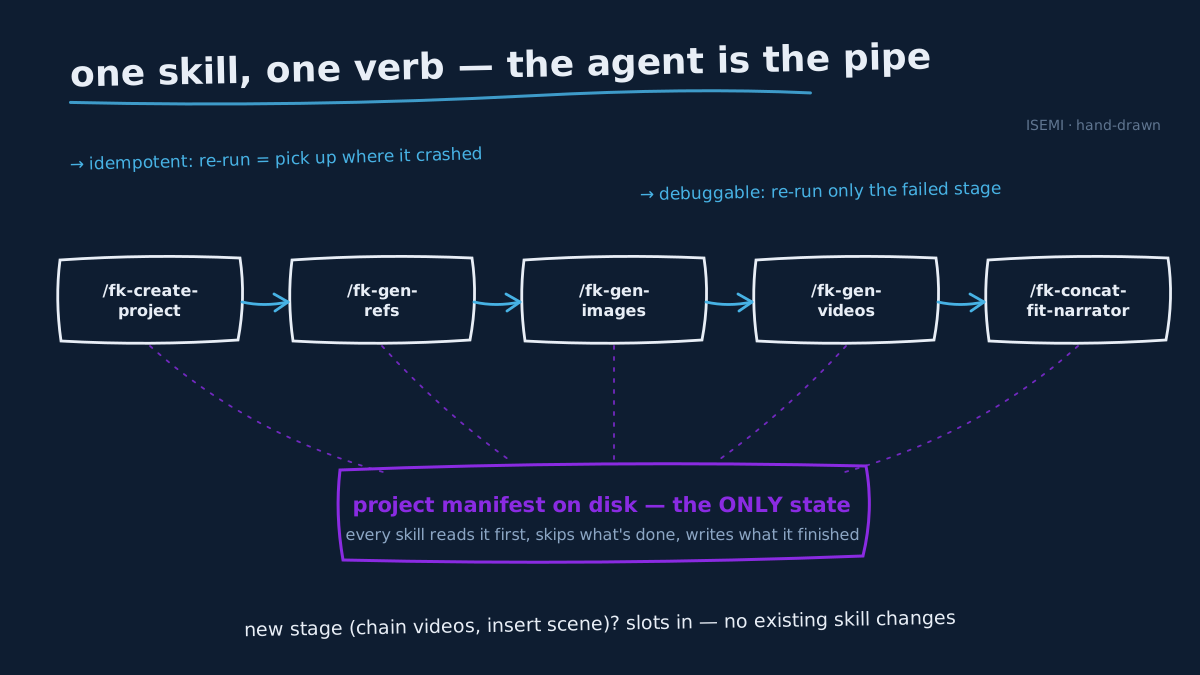
Instead every step is its own slash command, and each one owns exactly one verb. /fk-gen-refs only generates references. /fk-gen-images only generates scene images. They share a project manifest on disk, and they all refuse to run if their prerequisites are missing. The agent — or the human — composes them at run time.
The wins from that constraint are not subtle:
- Idempotency is free. Each skill checks the manifest first and skips work that is already done. Re-running
/fk-gen-videosafter a crash picks up at the first scene without a clip. Re-running the whole chain after a deletion regenerates only the missing pieces. - Resumability is automatic. Because every skill operates against the same on-disk manifest, the project is the single source of truth. There is no in-memory pipeline state to corrupt. Restart Claude Code, restart your laptop — the next slash command picks up where you left off.
- Debugging is cheap. When something fails, the only call you need to re-run is the one that failed. Half the cost of an AI video bug is locating which stage it happened in. Atomic skills tell you immediately.
Pattern 2 — skills compose, the agent orchestrates
We do not hardcode the order of operations in any single skill. A skill that called another skill would couple two pieces of the pipeline that we deliberately wanted decoupled. Instead, the agent — Claude — orchestrates. The user (or a higher-level skill) types the chain /fk-create-project … /fk-gen-refs … /fk-gen-images … /fk-gen-videos … /fk-concat-fit-narrator and the agent runs them in order, surfacing the output of each at the boundary.
This sounds like a small distinction. It is the entire reason we can introduce new stages without rewriting the world. When we added /fk-gen-chain-videos for smooth start-to-end frame chaining, no existing skill had to change. The chain skill slots in between /fk-gen-images and /fk-concat-fit-narrator when the user asks for it. When we added /fk-insert-scene to drop cutaways into an existing chain, again no existing skill changed.
The mental model is the Unix philosophy applied to agent workflows. Each skill is a small program with one job. The agent is the pipe.
Pattern 3 — skills above an API, not instead of one
A skill is a great place to describe what to do. It is a terrible place to put a Veo polling loop in pure prose. So we drew a hard line: skills are the recipe, but the heavy lifting lives in a small FastAPI service at 127.0.0.1:8100 that the skill calls over HTTP. The API knows about throttling, exponential back-off, media_id expiry, and Chrome-extension WebSocket plumbing. The skill knows when to ask the API and what to do with the answer.
That split is what lets the skill file stay around 90 lines of Markdown instead of becoming a 500-line bash script. It is also what lets a contributor read the entire user-facing surface of FLOW KIT in an afternoon by working through skills/ — the implementation details are in agent/ and they can dive in only if they want to.
The same split applies if you are building skills against a third-party API directly. Keep the skill descriptive ("call POST /v1/clips with these fields, retry on 429 with back-off, fail loudly on 422"), keep the retry math out. Markdown is bad at arithmetic; the agent should not be doing it inline.
Pattern 4 — the skill is the doc
The first thing a new contributor opens in our repo is skills/, not the README. Every /fk-* file is the same document for two audiences: the agent that executes it, and the human that needs to understand it. The frontmatter description is what shows up in the slash-command picker. The body is what runs at execution time and what gets read at review time.
That alignment removes an entire category of documentation rot. The skills cannot drift away from how the system actually behaves, because the skills are how the system behaves. When we want to change an invariant — for example, "do not try to upscale on a Tier One account" — we change it in the skill, and that change is simultaneously a behavior change, a doc update, and the diff a reviewer signs off on. One edit, three artifacts.
What didn't work — three anti-patterns we removed
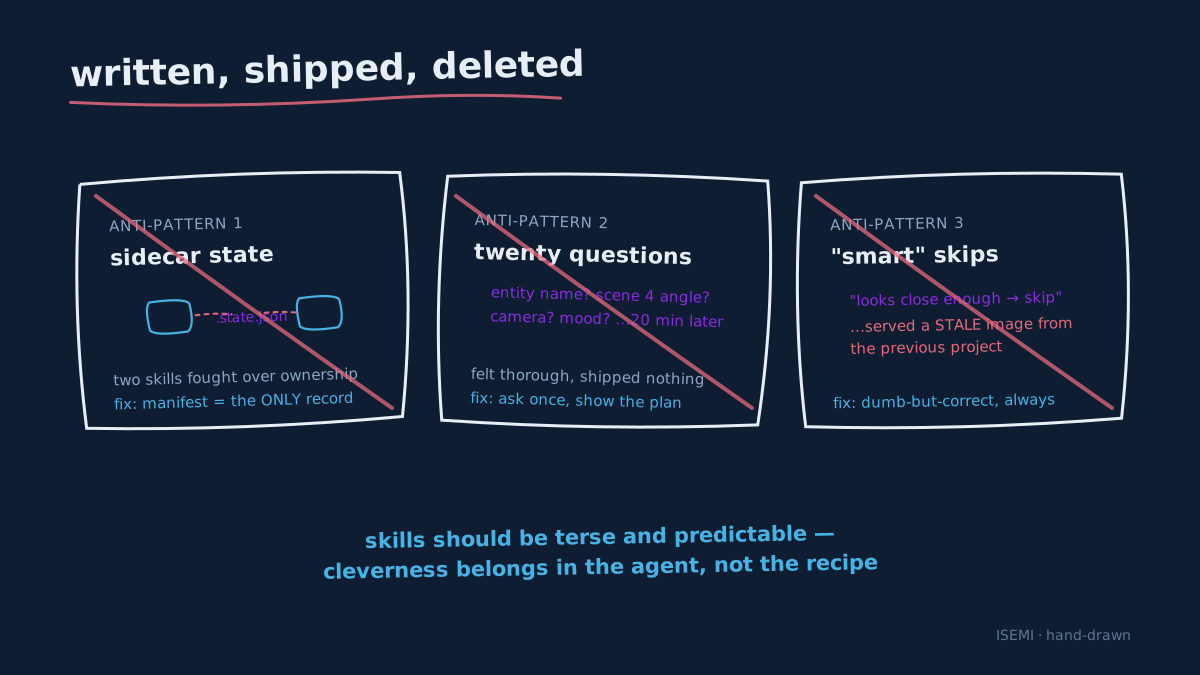
Not everything we tried survived. A short list of patterns we wrote and then deleted, because they looked good and aged badly.
Long-lived skill state. Our second iteration tried to give a skill its own JSON sidecar — a place to remember which scene it was on between runs. It worked until two skills disagreed about who owned the file. We deleted the sidecars and made the project manifest the only state of record. If a skill needs to know what is done, it reads the manifest. If it wants to mark something done, it writes the manifest.
Skills that ask too many questions. An early /fk-create-project asked the user for every entity name, every scene number, every camera angle interactively. It felt thorough. It also took 20 minutes to bootstrap a project. The current version asks once, for the story, and infers the rest from the story content — surfacing the inferred plan as a single block the user can edit before anything is committed. One round of editing beats twenty rounds of prompting.
"Smart" skills that skip steps. We tried a /fk-gen-images that detected when a scene image already looked "close enough" to a previous one and skipped regeneration to save Flow calls. It saved tokens. It also produced runs where one scene used a stale image from the last project. We pulled the heuristic and went back to dumb-but-correct: regenerate every requested image, every time, unless the manifest says it is done on this project.
The pattern under the anti-patterns is the same one: skills should be terse and predictable. Cleverness belongs in the agent, not in the recipe.
How to build your own video skill
If you are sitting on a workflow that is half-scripted and half-Slack-message — generate some images, run them through a model, batch-upload somewhere — you can write your first useful skill in an hour. The shape that has held up for us is:
- Pick one verb. "Generate the references." "Concat the cut." If you cannot describe the skill in three words, split it.
- Write the frontmatter. A
name, a one-sentencedescription, and the list of tools the agent is allowed to use while running it. Keep the tool list tight. - State the precondition. What must already be on disk or in the project manifest for this skill to run. If the precondition is not met, fail loudly and tell the user which earlier skill to run.
- State the work. A short numbered list. Two to seven steps. Anything longer is two skills.
- State the postcondition. What the world looks like when the skill is done. New file paths, manifest fields, log lines — whatever a later skill or a later human can verify against.
- Run it. Look at what the agent did. Edit the prose. This is the part that surprises people. The skill is iterated like a prompt — you read the trace, you tighten the language, you re-run.
skills/ in the FLOW KIT repo is the practical reference. The shorter skills (/fk-thumbnail, /fk-youtube-seo) are the easiest place to start reading; the longer ones (/fk-gen-chain-videos, /fk-insert-scene) show what the format looks like when the workflow gets complicated.
Why this matters now
The reason the agent community is suddenly talking about skills is that the bottleneck has moved. Frontier model capability is no longer the limiting factor for whether a domain-specific workflow works end to end. The limiting factor is whether someone has sat down and encoded the domain. Skills are the unit of that encoding. They are small enough to write in an afternoon, reusable enough to share, and legible enough to review — which is the property that finally makes agent workflows a thing teams can ship together instead of a thing individuals hack alone.
We built FLOW KIT to ship YouTube videos. The unexpected payoff is that the way it is built — Markdown recipes above a thin HTTP layer — turned out to be a general-purpose template. The next pipeline we wire up will not be video. It will follow the same anatomy.
Try it
The repository is at github.com/crisng95/flowkit. If you want to read skills before you install anything, skills/ is the single best directory in the repo. If you want the visual, canvas-driven sibling for branching e-commerce workflows, the companion post is FLOWBOARD — same Chrome-bridge approach, different ergonomics, same skill philosophy underneath.
Both projects live under the ISEMI open-source umbrella. If you write a skill on top of FLOW KIT for a domain we have not touched — narration cleanup, alternate uploaders, regional thumbnails — open an issue or drop the result in our community. The next round of improvements runs on what real teams actually need next.