

Producing one AI-generated YouTube video by hand takes a full day. You sketch the story, write a brief, generate a character reference, regenerate it because the eyes drifted, render each scene image, queue Veo for every clip, splice the results in a non-linear editor, layer narration on top, design a thumbnail, and finally upload. By the time the channel manager has a finished file, the creative brief is already cold.
FLOW KIT collapses that day into one terminal session. It is an open-source, MIT-licensed pipeline that wraps Google Flow and Claude Code into a story-to-upload engine that runs entirely on your machine — no API bill on top of the subscriptions you already pay for. The output is the kind of thing that, until very recently, you needed a small studio to ship.

What the pipeline actually produces
FLOW KIT is not a clip generator with a thin wrapper. Each project flows through a complete production chain: story → entities → reference images → scene images → 8-second video clips → narration via TTS → concat → thumbnails → YouTube upload. Every stage is exposed as a discrete API call and as a slash command, so you can drive the system end-to-end or attach to it at any layer.
The artifacts a single run leaves behind are surprisingly close to a manual production:
- Reference images — one per character, location, or prop, used as visual anchors for everything downstream.
- Scene images composed using the relevant references, so a character keeps the same face whether they are in surgery, an interview chair, or a Seoul street.
- 8-second video clips generated from each scene image with camera motion, sound effects, and timed dialog beats.
- Optional 4K upscale for finished clips on the Ultra tier.
- Voice-cloned narration per scene via OmniVoice TTS, then trimmed and concatenated to a final cut.
- YouTube-optimised thumbnails with text overlays, plus an SEO-ready title, description, and tag pack.
The six thumbnails above are not stock samples. They are real outputs from six different FLOW KIT projects — strategic geopolitics, naval engagements, cartel operations, defection stories. Same engine, six channels, zero hand-editing in Photoshop.
The reference system — why characters stay consistent
The single feature that separates FLOW KIT from "yet another Veo wrapper" is the reference image system. Every visual element that should stay consistent across an entire video — a character, a location, a hero prop — is generated once as a reference image with a UUID media_id. Every subsequent scene that includes that element passes its UUID into Flow as a visual anchor.

The mental model is the part most newcomers miss, so it is worth spelling out. Entity descriptions only describe appearance: "chubby orange tabby cat, big green eyes, blue apron, straw hat". Scene prompts only describe action: "Pippip stands behind Fish Stall, arranging fish on ice." You do not re-describe the cat in every scene. You name him. The reference image carries the cat forward.
The proof is the doctor character below. The same face, the same glasses, the same white coat appears in four wildly different settings — surgery, operating theatre, a seated interview, a closer interview — and the identity holds across all of them.

A 50-scene project does not turn into 50 lookalikes. It turns into a coherent story with a stable cast.
A full story arc — what 25 scenes from one project look like
To grasp the scale, here is one arc from a real F-15E rescue project. Twenty-five scenes, all rendered from the same reference set, all anchored to a single pilot character.

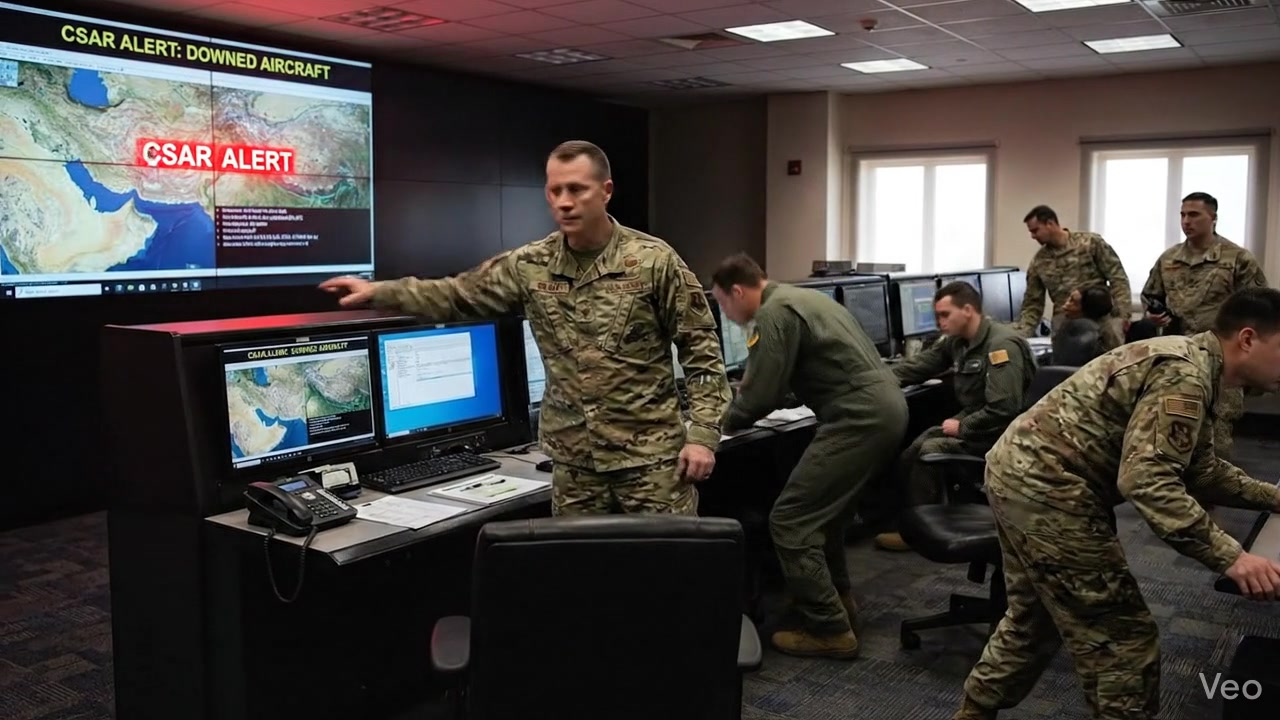

The pilot in the hit scene, the operators in the command centre, the survival mountains — the visual continuity is what convinces a viewer they are watching a story, not a slideshow. Compositional choices, lighting, and beat-to-beat narrative tension all hold up because the upstream reference work was done correctly. Get the reference layer right and downstream scene generation is mostly a matter of writing good action prompts.
How the pipeline runs end-to-end
Under the hood, FLOW KIT is a FastAPI service running on 127.0.0.1:8100 that talks to a Chrome MV3 extension over a localhost WebSocket on port 9222. The extension lives on the Google Flow tab, captures your bearer token, solves reCAPTCHA challenges, and proxies API calls without you ever touching cookies directly.
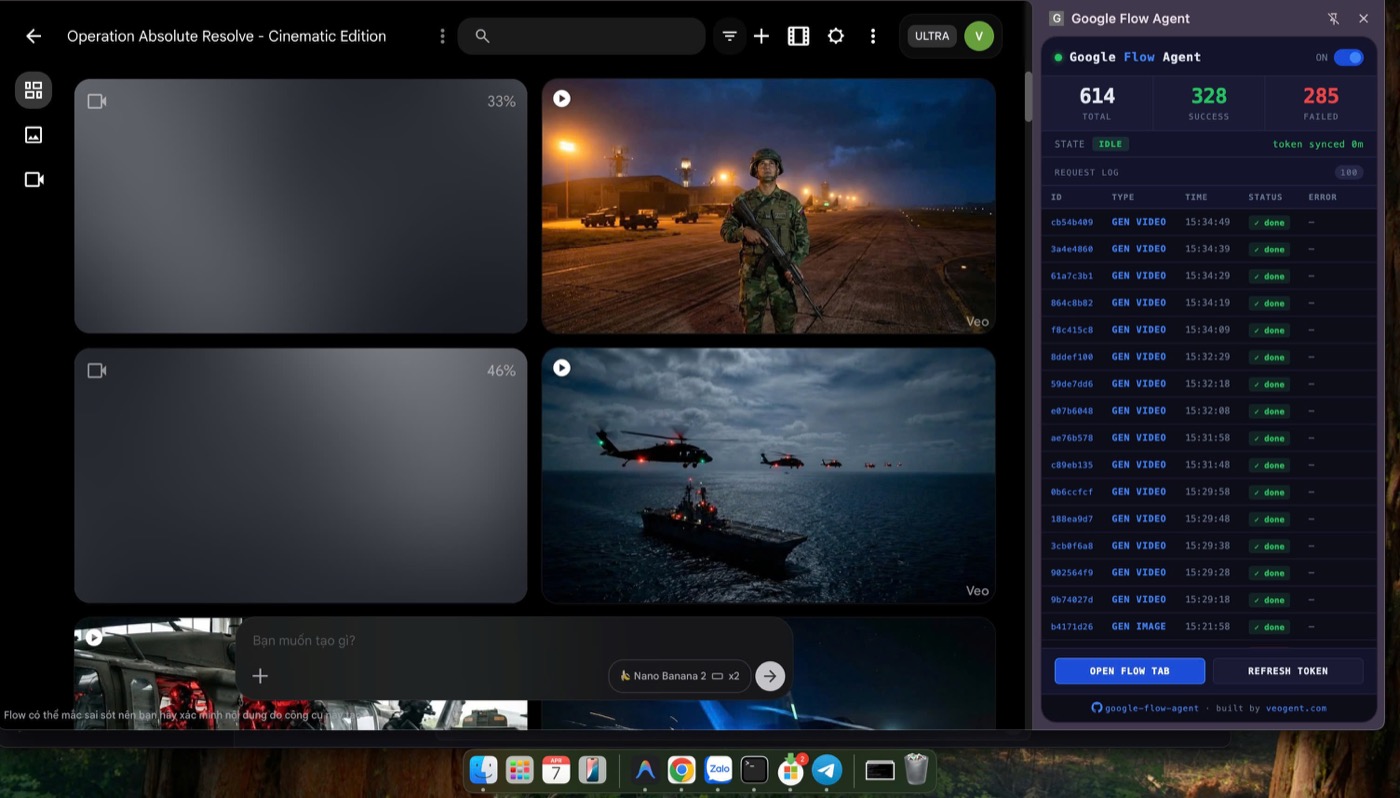
The dashboard above is from a real production run — 614 total requests, 328 successful generations, live token status. The Python agent pushes work to the extension; the extension routes it through your authenticated Flow session and returns results. From a high level the pipeline runs in eight steps:
- Create project —
POST /api/projectswith the story plus an array of entities (characters, locations, visual assets). - Create video —
POST /api/videosto group scenes under a single deliverable. - Create scenes —
POST /api/scenes, marking the first asROOTand the rest asCONTINUATIONwithparent_scene_id. - Generate reference images — one
GENERATE_CHARACTER_IMAGErequest per entity. Wait until each returns a UUIDmedia_id. - Generate scene images —
GENERATE_IMAGEper scene. The worker refuses if any referenced entity is still missing amedia_id. - Generate videos —
GENERATE_VIDEOper scene. Each takes two to five minutes; the worker polls so you do not have to. - Optional upscale —
UPSCALE_VIDEOfor Tier Two accounts that want 4K output. - Download and concat — pull the final URLs, normalise with
ffmpeg, concatenate to the final cut.
The worker handles throttling automatically: max five concurrent requests, ten seconds between calls, exponential back-off on transient 500s, and automatic re-upload when an image media_id expires after about an hour. You submit work and it gets done.
Skills as /fk-* slash commands
Driving the API by hand is exhausting. The friendlier surface is the skills layer — workflow recipes that live in skills/ as Markdown and double as native slash commands inside Claude Code. The five commands you will reach for first cover most of a production run:
| Command | What it does |
|---|---|
/fk-create-project | Interactive — asks for the story, creates entities and scenes |
/fk-gen-refs | Generates all reference images, verifies every entity got a UUID |
/fk-gen-images | Generates scene images with all relevant refs applied |
/fk-gen-videos | Generates 8-second videos and polls until each finishes |
/fk-concat-fit-narrator | Trims scene videos to the narrator track and concatenates |
Beyond the basics there are advanced flows: /fk-gen-chain-videos for smooth start-to-end frame chaining, /fk-insert-scene for cutaways and close-ups inside a chain, /fk-camera-guide for cinematic angle direction, /fk-gen-tts-template and /fk-gen-narrator for voice-cloned narration, /fk-youtube-seo, /fk-brand-logo, /fk-thumbnail, and /fk-youtube-upload to close the loop with rule-validated, scheduled publishing.
The skills are CLI-agnostic. Claude Code reads them via CLAUDE.md; Codex CLI and Gemini CLI read them via their own entry files. You pick the agent you already use.
Setup in 60 seconds
Trying it should not feel like an afternoon project. The repo ships a one-command setup that checks for Python 3.10+, ffmpeg, ffprobe, and Chrome, then builds a venv and installs the dependencies. From a fresh clone:
git clone https://github.com/crisng95/flowkit.git
cd flowkit
./setup.sh
source venv/bin/activate
python -m agent.main
Then in Chrome, open chrome://extensions, switch on Developer mode, click Load unpacked, and pick the extension/ folder. Open a tab at labs.google/fx/tools/flow and sign in. A quick curl http://127.0.0.1:8100/health should answer with {"status":"ok","extension_connected":true}. You are ready.
Windows users: run it under WSL. Every script in the repo assumes a Unix shell.
Cost reality check
This is the part where most "AI YouTube automation" articles get vague. FLOW KIT does not add a metered API bill on top of your existing subscriptions, but it is not free either. To run the video pipeline you need a paid Google Flow plan — Pro or Ultra — because Veo 3.1 i2v is gated to those tiers. The free tier and trial accounts cannot drive video generation, full stop. For Claude Code, the slash commands run against your existing OAuth subscription; there is no separate API key to provision.
In other words, if you are already paying for Claude Code and a Flow Pro plan, FLOW KIT is purely additive. If you are not, the cost floor is whatever those two subscriptions add up to in your region. That is the honest number. There is no hidden compute, no proxy fees, no cloud bill — everything else runs locally on your laptop.
What it doesn't do (yet)
A few things are explicitly out of scope right now, and worth flagging so you don't discover them mid-project:
- It does not currently bundle a music library — by design, the worker auto-appends "no background music, keep natural sound effects" to every video prompt, because Veo-generated soundtracks tend to fight the narration.
- It does not host a web UI. The interface is a CLI plus a Chrome extension dashboard. If you want a visual canvas, that is what its sibling tool FLOWBOARD is for.
- Upscale to 4K requires
PAYGATE_TIER_TWO. Tier One accounts will see a tier-mismatch error and the run will fail clearly with a fix-it message.
The roadmap is open in the repo and PRs are welcome. If you ship a YouTube channel on top of this, the project lead actively wants to hear about it.
Try FLOW KIT
The repository is live at github.com/crisng95/flowkit. The setup script is the front door; the skills/ directory is the rest of the documentation. If you want the visual, canvas-driven sibling for branching e-commerce workflows instead of linear YouTube videos, read our companion post on FLOWBOARD — same Chrome-bridge approach, very different ergonomics.
Both projects live under the ISEMI open-source umbrella — head to the homepage to see what else we are shipping in this space. If you build something with FLOW KIT, drop the result in our shared community on Facebook or open an issue on the repo. The next round of improvements is driven by what real channels run into in production.